#1 Using System Restore
You would be knowing about the system restore feature of the Windows in which you first create the backup of your Windows when it is working fine and then you can restore it to the same settings in the future. Here you have to do the same and restore your system to the point when it was working fine and was not having any registry issue. This will also restore the registry to the previous point, hence solves the errors related to it. Below are the steps how you can restore your system while you are using Windows.
Step 1. First of all, open the control panel on your Windows. Here in the control panel, search for the ‘System Restore’ option and click it.
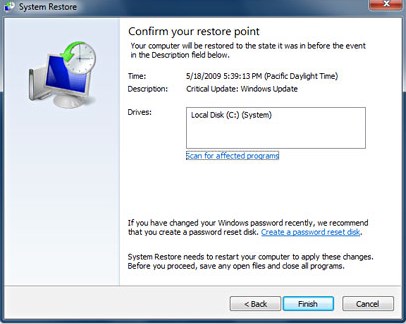
Step 2. This will open the System Restore panel. If you had created the backup for your system before, you will see that backup in the ‘System Restore‘ panel. Select the restore point from there.

Step 3. After selecting the restore point, click on the “Scan for the affected programs” button on the System Restore panel. This will start the scanning of the restore point for affected programs. If there are no affected programs found on the selected restore point then you can go ahead and restore your computer to that point by clicking “Next” and then “Finish” button that appears on the panel.
#2 Using Software
There is some software available in the market that you can use to solve the errors related to the registry. These software work by restoring the registry to the previous point where it worked fine. This software can also use the information from the internet to update your registry it also finds the issues with your registry and then tries to fix them, all you have to run through some of the options within this software and you shall get the errors removed. One of the best software that you can also use to solve registry problems is CCleaner. This software has particular options inside to work with the registry of the computer on which you have installed it. You can Download & Install the CCleaner from here.

You can also fix your computer for Windows errors by cleaning it. Just clean the trash and junk files from your system and it shall fix the errors. For cleaning the system, you can again use the CCleaner software on your computer.

No comments:
Post a Comment